
Make an offer
$90
Buy
About the add-on:
- The «Make an offer» add-on lets a user propose their own price for a product or service.
- This add-on increases the likelihood of closing a deal faster between the buyer and the seller.
How it works:
- When a user opens a product or service page, a «Make an offer» button appears in the top-right corner.
- When the user clicks the button, a form opens. After it is submitted, the seller receives a notification email.
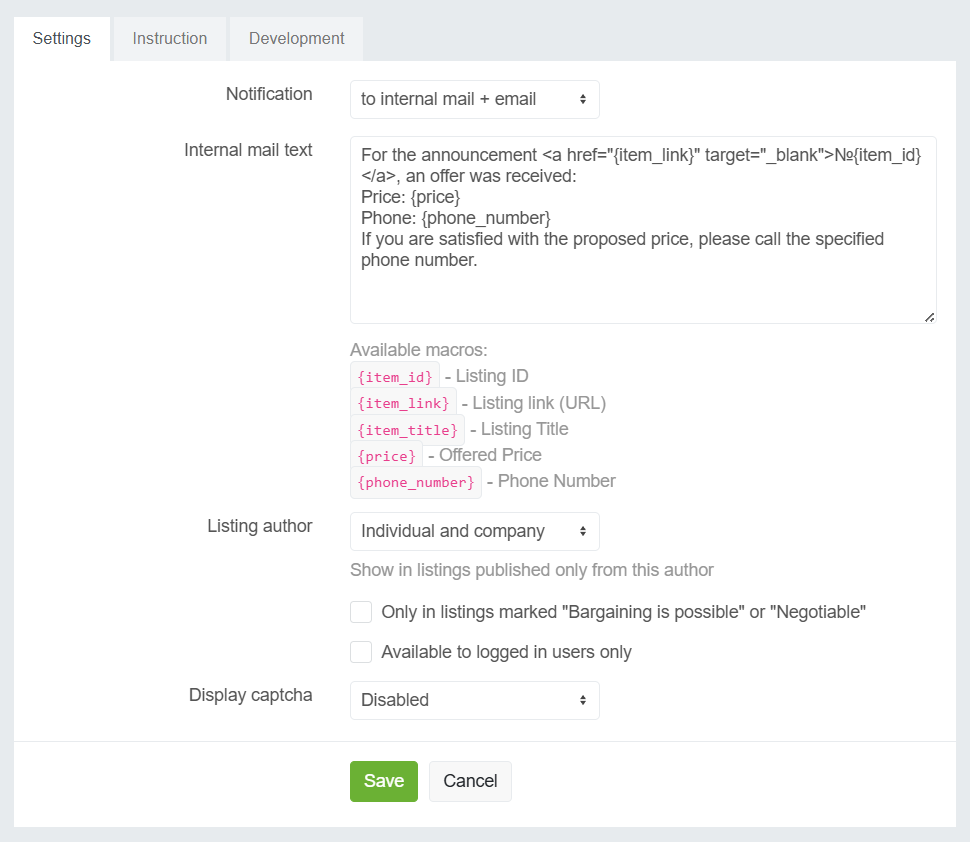
- On the admin side, you need to configure the email template that the seller will receive.
Version 1.0.6
- Added a setting to show the feature only in listings with the selected author type (Private individual, Store), and also based on the «Negotiable» / «By agreement» label.
Support within the main service
| Category: | Listings, Miscellaneous |
| Current version: | 5.0.0 |
| Updated: | 16.08.2026 |
| Developer: | Tamaranga |
| Compatibility: |
 AMP 3.5.0+
 RP 3.3.0+
 CP 3.0.0+
 MP 3.0.0+
|
Other add-ons from this category
